
Live scouting
Track the match point by point from the bench: score, player actions, quick corrections and a live box score ready to share.
Where it is and who uses it
Open More → Scout Live, or start it from the match page. Tracking requires the Scouting permission, which the founding coach can give to coaches, staff or individual athletes. Other approved members can read the box score.
Creating a match scout
From the match page (recommended)
- Open the match and, in Materials, tap Start live scout.
- Opponent, date and venue are already filled in. Your roster is the match roster: the whole active roster or the called-up players, excluding athletes with a recorded absence.
- Check the opposing team and create the scout. It stays linked to the match.
Version 2.2.0 update: web app available now; iPhone and Android available after updating the app to 2.2.0.
From the Scout Live section
- Tap the button to create a new scout.
- Info: competition type and name, date, time, venue and referees (optional).
- Home and Away: for each side choose your team, an opponent you saved manually, a roster imported from a .dvw file, or a new team with its players.
- Tap Create Scout.
During the match
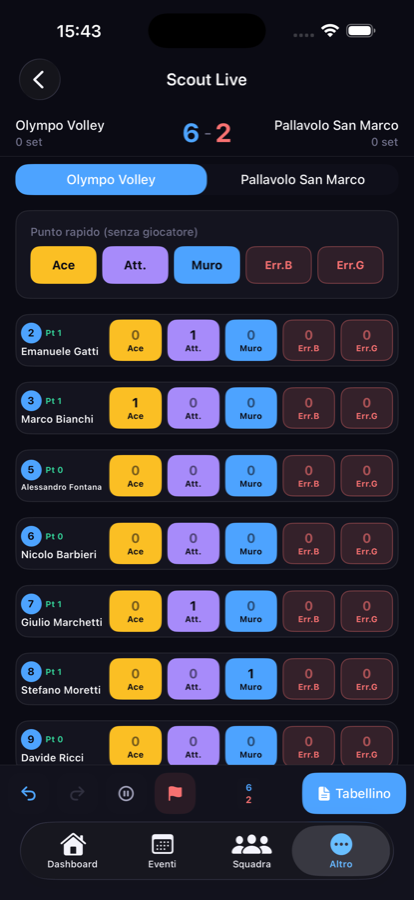
The scoreboard shows both sides' scores and the set strip. For every rally:
- tap the player who scored and the action type: Ace, Attack or Block;
- record errors the same way: serve error or generic error;
- if you don't want to assign the action to anyone, use the quick buttons at the top: the point goes to the team with no player;
- log timeouts for both teams.
Sets follow volleyball rules: 25 points to win (15 in the fifth set), always with a two-point lead.
Corrections: undo and redo
Gave the point to the wrong player? Tap the back arrow to undo the last action, as long as it belongs to the set still in progress. The forward arrow restores what you just undid. If another device changed the last action, undo is blocked to avoid removing the wrong point.
End of set and end of match
The point that would close a set or the match always asks for explicit confirmation. You also have End set and End match to close manually, for example after a forfeit.
Without a connection
- iPhone and Android store pending actions on the device. Open the match with a connection before using it offline and don't clear the app's data until the pending actions counter is back to zero.
- Web app: keeps an action queue while the page stays open. Reopening the web app needs a connection; saved actions are then sent in order.
The counter distinguishes actions saved on the device from those confirmed by the server.
The live box score
At the end of the match you get the live box score: result, set strip and each player's points from aces, attacks and blocks, with recorded errors.
- The top scorer is calculated automatically from points.
- The MVP isn't automatic: it's an optional choice made by the coach.
In the iPhone and Android apps:
- PDF: exports the live box score as a one-page A4 report with the team logo. The file is named Tabellino-live-… to tell it apart from uploaded box scores.
- Recap: generates a press text with result, set scores, points next to each surname, referees, set durations and counts of aces, blocks and missed serves. You can edit it before copying.
Live scouting, .dvw files and statistics
Live scouting records the match points. If your team's scout uses software that exports .dvw files, import the file after the match for full reports and Game analysis.
When the same match has both the live box score and an associated .dvw file, the .dvw file takes precedence in statistics: the two sources are not added together.