
Video analysis
Upload the match video, link the .dvw scout file and review every rally, filtering by player, skill and outcome.
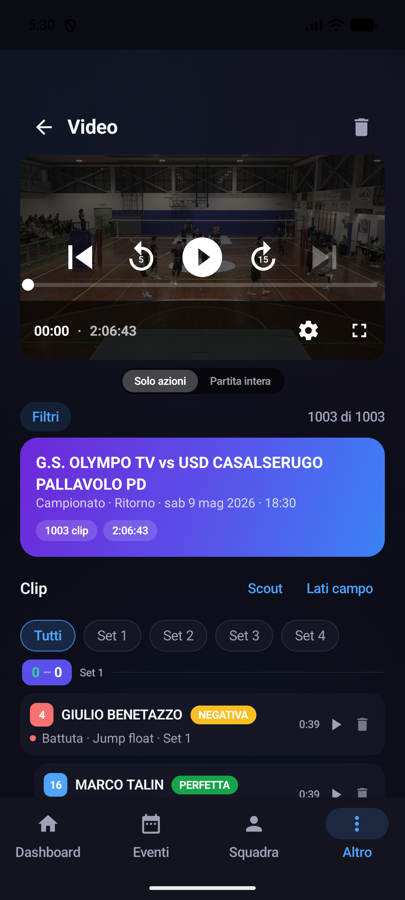
Where it lives and who does what
Open More → Match Videos. The whole team can watch videos; uploading is for the coach and staff members with permission to add videos; only the coach can delete a video.
Uploading a match video
- Tap the upload button and pick the file from your photo library or files (MP4, MOV or AVI, up to 25 GB from the web app and updated apps).
- Fill in the match details: home and away team (with a button to swap them), competition, first/second leg, date and time. The video title is composed automatically.
- If you like, link the video to a match already imported in Statistics. From version 2.2.0 videos can also be linked to the Match page.
- Tap Upload and wait for the upload to finish.
Formats and the "processing" state
After upload every match is automatically optimized in high quality: it stays in 1080p with the same smoothness (up to 60 frames per second) but takes far less space, and videos shot in HDR on an iPhone are brought back to natural colours, so they look right on every phone and computer. A 2-hour match can take up to about an hour: meanwhile the video may show as processing. MP4 files that are already light are ready right away. Your plan's storage counts the optimized size: a 16 GB match takes about 2.5 GB once ready.
Clips from the .dvw scout file
This is the heart of Video analysis: by importing the match's .dvw scout file, the app automatically creates a clip for every rally, with set, score, player, shot type, outcome and game phase. From the video menu you can:
- Use scout from Statistics — reuse the .dvw file already imported in the Statistics section, without uploading it again;
- Upload new file (.dvw) — import the file directly here.
Court sides
With the Court sides option you set, set by set, which side of the court your team plays on in the video. It's needed to orient the shot trajectories correctly on the mini court; the side switch between sets is handled accordingly.
The web fixes are already available. Mobile controls require the 2.2.2 update from the store, subject to approval and distribution by Apple or Google.
Timing, fifth set and quick seeking
- Action order: clips preserve the scout sequence, even when timestamps coincide or move backwards.
- Clip timing: the default window starts 1 second before and ends 5 seconds after the action; setting actions have an additional 2-second delay. Use the timing controls to adjust these values; valid custom settings are retained.
- Fifth set: set the camera-side team separately before and after the first team reaches 8 points. The score at the start of the rally determines the side. Without a usable score, the side is shown as unknown.
- iOS and Android: double-tap the right side of the video to advance 5 seconds, or the left side to go back 5 seconds. Playing or paused state is retained. Leaving the selected clip releases its automatic stop. In Android playlists, seeking stays within the loaded clip.
- Web: expand Video and scout to read full athlete names and collapse Filters and timing to leave more room for the actions.
Watching the clips
The player gives you full control over the review:
- Two views: Rallies replays each exchange in full (score, duration and touch count), Touches shows the single skills;
- Filters: team, player, skill with its own results, set, phase (side-out or break point) and shot zone on a drawn court — perfect for reviewing "all of number 7's attacks" or "all the negative receptions";
- Action time: choose how many seconds to watch before and after each touch, or the whole rally;
- Modes: "Rallies only" jumps from one clip to the next in sequence, "Full match" keeps playing the video from the point you pick;
- Start sync adjustable by a few seconds, in case the scout file's timecode is slightly off;
- shot trajectories on the mini court, toggled on top of the video;
- full screen for reviewing with the team.
Automatic measurements (beta)
Some clips show a label computed by our models from the video: on serves the average speed (e.g. "62 km/h"), on attacks the contact height, i.e. the height of the ball centre at the moment of the hit (e.g. "Contact 3.12 m"). The label only appears where the model has a reliable value: clips without it are not an error. Tap the label on the player to read the explanation and, if the value looks wrong, use Report wrong value: reports help us improve the models during this beta.
Storage space
Videos are heavy: the PRO plan includes 50 GB of storage, the CLUB plan 120 GB. If you hit the limit, the app warns you at upload time and you can free up space by deleting older videos.